
Uploady Download Speed Test: Chrome and JDownloader 2
Our retained Uploady screenshots show 474 KB/s on free access, 16.5 MB/s in one Premium Chrome download, and a displayed average total of 40.82 MiB/s across four Premium JDownloader 2 downloads.
This page explains what each screenshot shows, how the workloads differ, and how to check your setup if downloads are slower than expected.
Results at a Glance
| Account | Application | Workload | Displayed speed | Measurement |
|---|---|---|---|---|
| Free | Chrome | One 767 MB RAR file | 474 KB/s | Browser rate at capture |
| Premium | Chrome | One 1.1 GB RAR file | 16.5 MB/s | Browser rate at capture |
| Premium | JDownloader 2 | four active files | 40.82 MiB/s | Displayed total average |
| Premium | JDownloader 2 | four active files | 42.04 MiB/s | Current total at capture |
Units remain as displayed by the applications: KB/s, MB/s and MiB/s.
Test Method and Evidence
The results come from three screenshots taken during active transfers. Each browser capture shows one file. The JD2 capture shows four files downloading simultaneously.
Chrome’s displayed speed is the rate visible when the screenshot was taken. The remaining time is an estimate, not a measured completion time.
JD2 displays both an average and a current total speed. The average is the value reported by the application in that capture; it is not an independently calculated average across repeated tests or all completed files.
The files and transfer conditions were not identical. These results document the recorded sessions rather than a controlled comparison using the same file and server. Your connection, ISP routing, file server and time of day can affect performance.
Test 1: Free Chrome Download — 474 KB/s
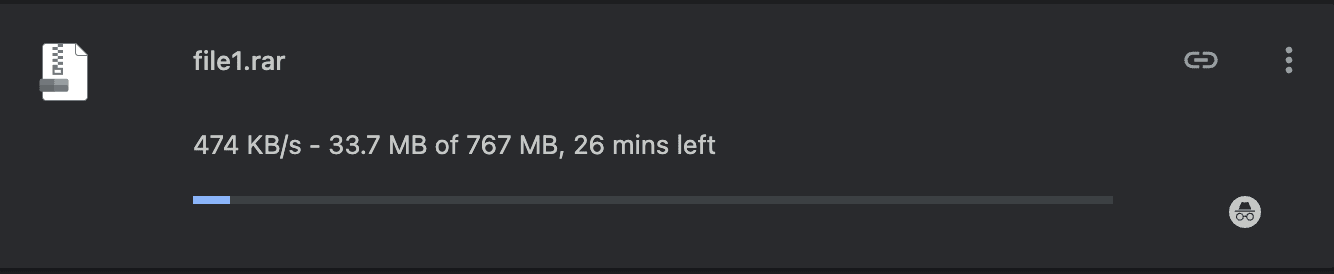
The free Chrome capture shows one RAR file downloading at 474 KB/s.
| Detail | Displayed value |
|---|---|
| File size | 767 MB |
| Data transferred | 33.7 MB |
| Displayed speed | 474 KB/s |
| Estimated time remaining | About 26 minutes |
This rate is useful evidence of what free access achieved during that transfer. It should not be presented as a fixed limit for free accounts.
Older comparison material listed 100 KB/s for free access. The retained screenshot shows a higher rate. Distinguish the published limit from the observed result when comparing account features.
At the rate shown here, a large archive or multi-file queue would take substantially longer than in the paid-account captures.
Test 2: Premium Chrome Download — 16.5 MB/s
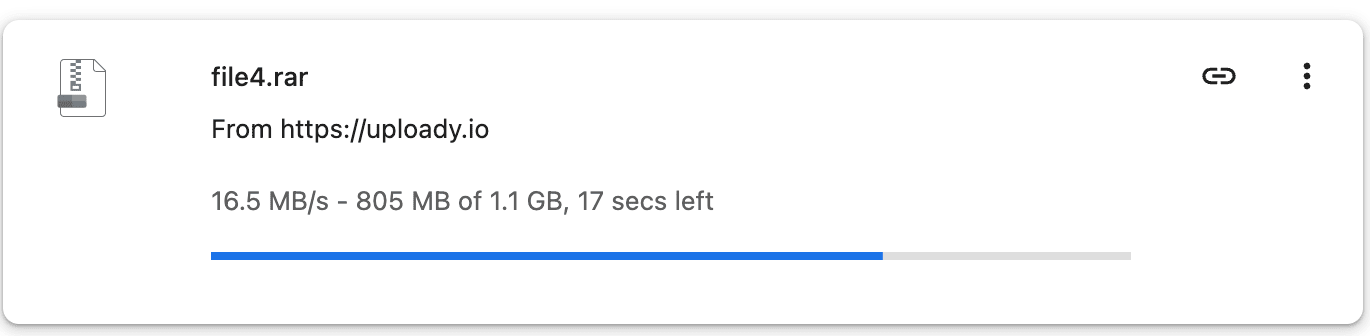
The Premium Chrome capture shows a single RAR file downloading at 16.5 MB/s.
| Detail | Displayed value |
|---|---|
| File size | 1.1 GB |
| Data transferred | 805 MB |
| Displayed speed | 16.5 MB/s |
| Estimated time remaining | About 17 seconds |
The visible Premium rate was much higher than in the free capture. Comparing the displayed figures gives a difference of about 35 times, although the files and transfer conditions differed.
The screenshot shows that one Premium file reached a high rate directly in Chrome. It does not establish the average speed for the whole download.
Test 3: Premium JDownloader 2 — 40.82 MiB/s Average Total
The JD2 capture shows four Uploady files downloading in parallel. The application reports an average total speed of 40.82 MiB/s and a current total speed of 42.04 MiB/s.

| Detail | Displayed value |
|---|---|
| Active files | 4 |
| Average total speed | 40.82 MiB/s |
| Current total speed | 42.04 MiB/s |
| File 1 | 7.63 MiB/s |
| File 2 | 8.52 MiB/s |
| File 3 | 12.81 MiB/s |
| File 4 | 12.52 MiB/s |
40.82 MiB/s is JD2’s displayed combined average, not the speed of one file. Likewise, 42.04 MiB/s is the current total at capture time, not a verified peak.
This session achieved higher combined throughput than the retained single-file Chrome capture. It also confirms that JD2 worked with the paid account at the time of the test.
What the Results Mean
The captures support three practical observations:
- Free access was slower. The free browser transfer displayed 474 KB/s.
- Premium performed well in Chrome. One file reached 16.5 MB/s without a separate download manager.
- The JD2 session achieved higher combined throughput. Four active files produced a displayed average total of 40.82 MiB/s.
If you mainly download one file at a time, the Chrome result is the more relevant comparison. If you download multi-part archives or regular queues, the JD2 result shows how several files performed together.
Speed and daily traffic both matter. A fast connection can use up a plan’s allowance quickly, so compare your expected download volume with the available quotas.
Using Uploady Premium in JDownloader 2
To add your account:
- Open Settings → Account Manager in JDownloader 2.
- Select Add and search for
uploady.io. - Enter your account login details.
- Confirm that JD2 recognizes the account as paid and that it has not expired.
- Add your file links and start the queue.
These are setup instructions, not a record of the exact settings used in the retained test. The screenshot shows four active files but does not state the configured chunk count.
If Downloads Are Slower Than Expected
Check account recognition. Make sure your browser or JD2 is using your active paid account. Refresh the account status if needed.
Check local speed limits. In JD2, confirm that no download speed limit is enabled. Pause other large transfers that may be using your connection.
Adjust parallel downloads gradually. Start with two or three files and observe combined speed. Increase the number only if speed and stability improve.
Try another file. Different files may use different servers or routes. Comparing several links helps show whether the issue affects one transfer or the whole queue.
Refresh expired links. If a temporary download URL stops working, request a fresh link before trying to continue.
Compare different times. A second test later in the day can help identify changes in network or server conditions.
Choosing a Premium Plan
The recorded paid sessions achieved much higher speeds than the free capture. A 30-day plan offers a lower upfront commitment if you want to test Uploady on your own connection. Longer plans may suit regular use.
Compare prices, durations and daily quotas in our Uploady Premium buying guide. For common account questions, visit the Uploady FAQ.